Terminal delivery order (TDO)
To understand the context of how a Logistics Service Provider can manage a Terminal Delivery Order, please review https://documentation.nxtport.com/bulkchain/logistics-service-provider-integration-specificati. Below page is limited to the capabilities available for a Terminal Operator.
Get list of terminal delivery orders
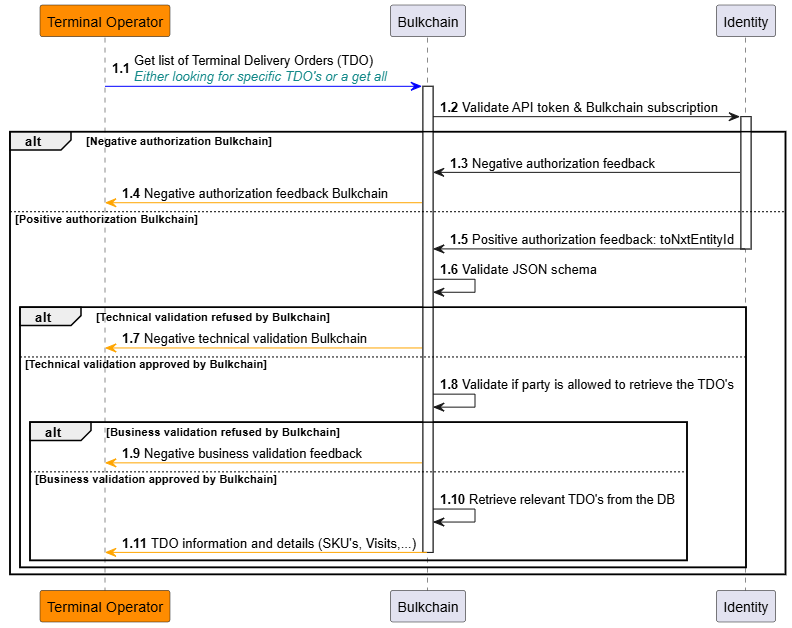
Both the logistics service provider and the terminal operator have the possibility to retrieve the dataset of either specific terminal delivery orders, or of all terminal delivery orders which were created in the last 365 days. Specific TDO’s can be requested by its respective Bulkchain-generated TDO Keys, Bulkchain will validate if the TDO Keys exist for the requester and if the requester is allowed to retrieve them.
If one or more TDO’s can be found, Bulkchain will respond synchronously by providing the full datasets of either the specifically requested terminal delivery orders, or the full datasets of the terminal delivery orders created in the last 365 days, all within one feedback response.
If no TDO can be found, Bulkchain will respond with a synchronous empty response.
Get (list of) stock keeping unit(s)
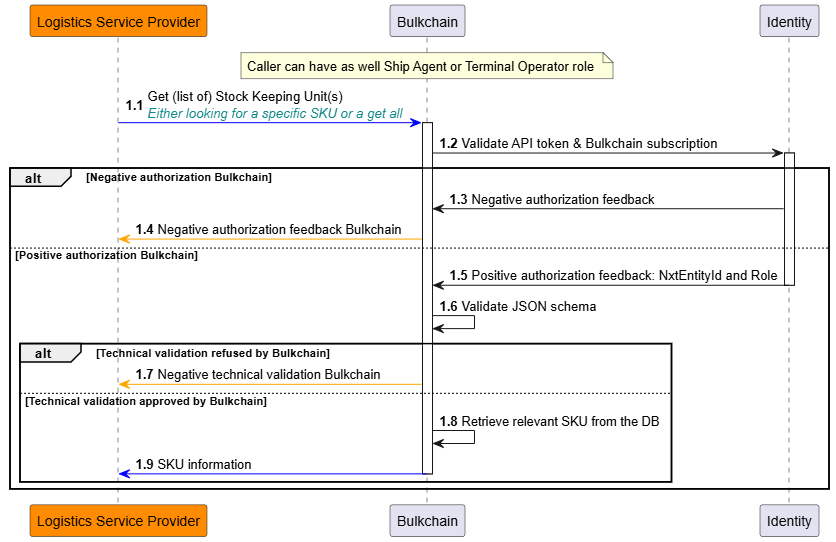
Both the logistics service provider and the terminal operator have the possibility to retrieve the stock keeping unit(s) dataset for either:
-
a specific stock keeping unit, or
-
a terminal delivery order, or
-
a get of all stock keeping units which were created in the last 365 days.
Specific stock keeping units can be requested by its respective Bulkchain-generated keys, Bulkchain will validate if the SKU Key, SKU batch Key, Visit Key, TDO Key or VLO Key exist for the requester and if the requester is allowed to retrieve them.
If one or more stock keeping units can be found, Bulkchain will respond synchronously by providing the full datasets of either the specifically requested stock keeping unit(s), or the full datasets of the stock keeping units created in the last 365 days, all within one feedback response.
If no stock keeping unit can be found, Bulkchain will respond with a synchronous empty response.
Get (list of) visit(s)
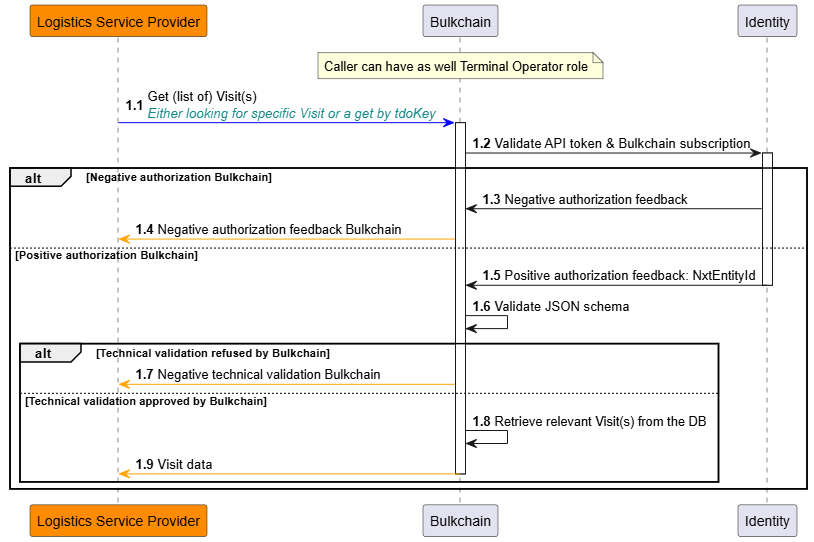
Both the logistics service provider and the terminal operator have the possibility to retrieve the visit(s) dataset for either:
-
a specific visit, or
-
a terminal delivery order, or
-
a get of all visits which were created in the last 365 days.
Specific visits can be requested by its respective Bulkchain-generated keys, Bulkchain will validate if the Visit Key or TDO Key exist for the requester and if the requester is allowed to retrieve them.
If one or more visits can be found, Bulkchain will respond synchronously by providing the full datasets of either the specifically requested visit(s), or the full datasets of the visits created in the last 365 days, all within one feedback response.
If no visit can be found, Bulkchain will respond with a synchronous empty response.
Update of the terminal delivery order
After the terminal delivery order has been created by the logistics service provider, both the logistics service provider and the terminal operator have the possibility to update that same terminal delivery order.
As a terminal operator, the following update use cases are possible within a specific terminal delivery order:
-
Update its general information (i.e., adding a terminal operator reference)
-
Update an existing visit (i.e., adding a terminal operator reference)
Important to consider is the fact that Bulkchain only supports the usage of the Bulkchain-generated keys (TDO Key, SKU Key, Visit Key) for any update/delete/assign/unassign operation within Bulkchain on existing objects. These keys are available in the success notifications, please go to https://documentation.nxtport.com/bulkchain/success-notifications for more information.
Across all update use cases, the general principle is that the request starts for one specific terminal delivery order by providing the TDO Key, which needs to exist in Bulkchain and which needs to be linked to the requester.
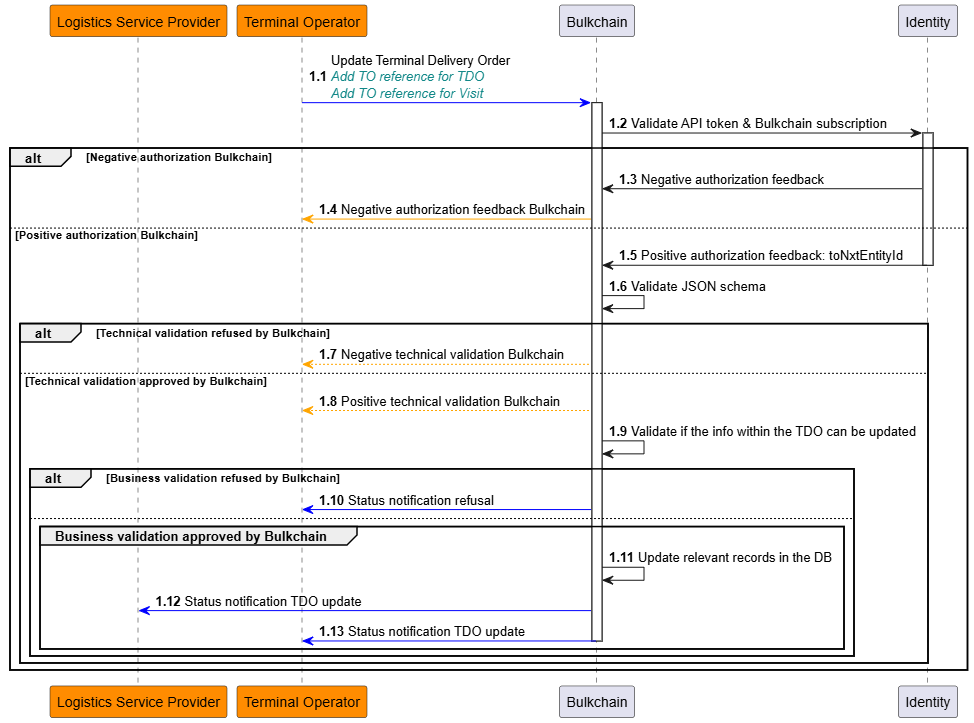
Update general terminal delivery order info
The terminal operator only has the option to add its own reference to the terminal delivery order.
Bulkchain will send a notification of the update success towards the original requester, being the terminal operator, and the logistics service provider, including the original TDO Key as unique reference for the respective updated terminal delivery order.
Via this TDO Key, the updated full dataset of the related terminal delivery order can be retrieved from Bulkchain.
Update visit info in the terminal delivery order
The terminal operator only has the option to add its own reference to the visit.
Bulkchain will send a notification of the update success towards the original requester, being the terminal operator, and the logistics service provider, including the original TDO Key as unique reference for the respective terminal delivery order, as well as the Visit Key representing the visit which was updated.
Via this TDO Key, the updated full dataset of the related terminal delivery order can be retrieved from Bulkchain.
Terminal delivery confirmation
Once a specific visit from a terminal delivery order arrives at the terminal with its respective stock keeping units, the terminal operator needs to submit a terminal delivery confirmation for the stock keeping units on that visit, indicating that the stock keeping units have arrived and were well-received at the terminal.
When the visit arrives, the terminal operator has the possibility to confirm:
-
the full set of stock keeping units which were originally defined on that visit within the terminal delivery order, or
-
a subset of stock keeping units which were originally defined on that visit within the terminal delivery order, in case there were less stock keeping units on the physical transport. Both options are possible via the same message request.
In case there are (3) more stock keeping units on the physical transport than originally defined for that visit within the terminal delivery order, the terminal operator can only confirm the stock keeping units which exist in the terminal delivery order and that are planned on the Visit. Regarding the additional stock keeping units, they first need to be assigned by the logistics service provider for that visit, before the terminal operator can submit a new terminal delivery confirmation for them.
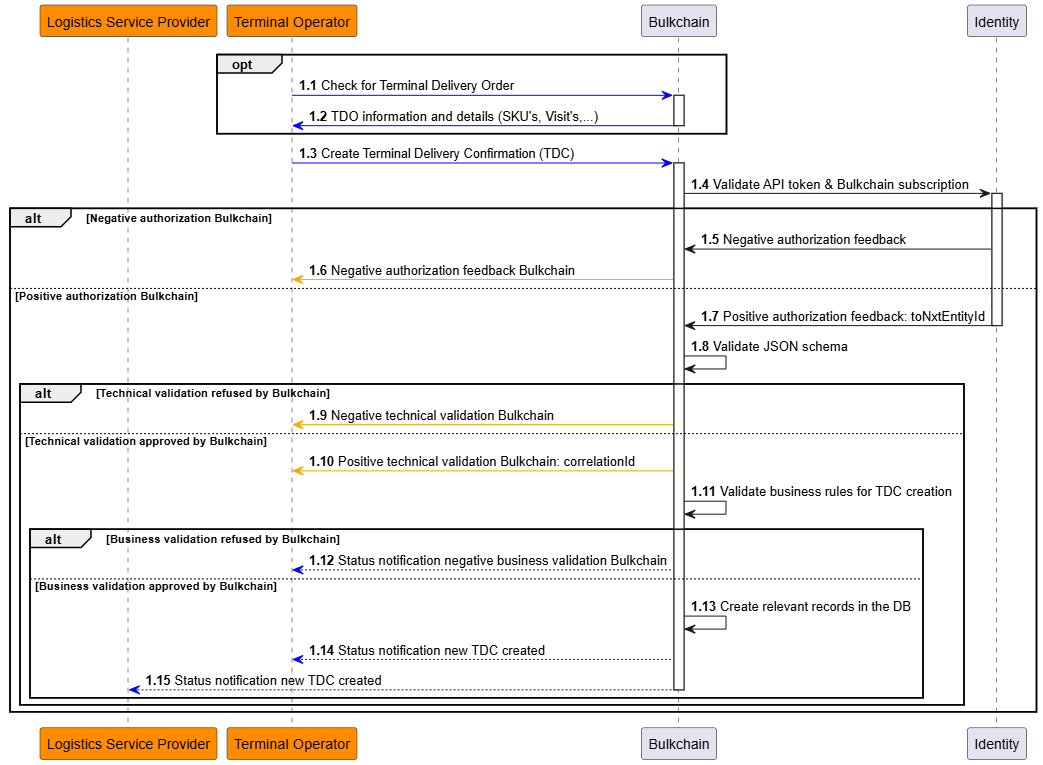
Upon successful technical validation by Bulkchain, asynchronous processing will be done by Bulkchain. Here, a set of business rules will be validated upon the received request:
-
Check that the visit exists for the terminal operator which has submitted the request, and
-
Check there’s no terminal delivery confirmation yet for one of the stock keeping units which is linked to that visit, and
-
In case the terminal operator mentions a specific set of stock keeping units, these need to exist and be linked to the abovementioned visit, while not having a terminal delivery confirmation already.
When the business validation has passed, Bulkchain will send a notification of the terminal delivery confirmation success towards the original requester, being the terminal operator and the logistics service provider, including the original TDO Key as unique reference for the respective terminal delivery order, the TDC Key as unique reference for the respective terminal delivery confirmation and the Visit Key as unique reference for the respective visit.
Update of the stock keeping unit during the terminal stay
Once a specific stock keeping unit has been confirmed by the terminal operator, they get the ability to update that stock keeping unit. For the logistics service provider, the update remains possible as before the terminal delivery confirmation https://documentation.nxtport.com/bulkchain/logistics-service-provider-integration-specificati#LogisticsServiceProviderintegrationspecifications-UpdateSKUinfo.
As a terminal operator, the following update use cases are possible for a specific stock keeping unit:
-
Update properties which physically describe the stock keeping unit
-
Identification code
-
Commodity description
-
Number of pieces within the stock keeping unit
-
Package code
-
Package description
-
Marks and numbers
-
Weight
-
Length
-
Width
-
Height
-
-
Add a goods condition
Important to consider is the fact that Bulkchain only supports the usage of the Bulkchain-generated keys (TDO Key, SKU Key) for any update operation within Bulkchain on existing objects.
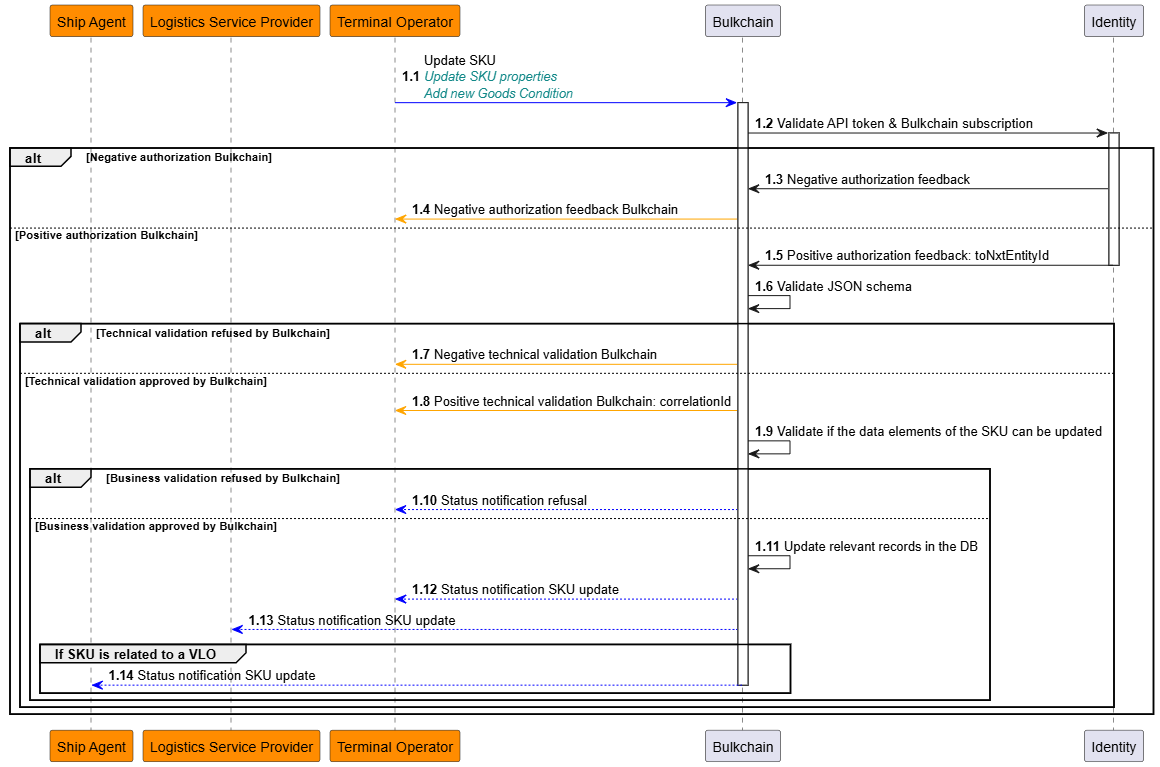
Upon successful technical validation by Bulkchain, asynchronous processing will be done by Bulkchain. Here, a set of business rules will be validated upon the received request, depending on the update use case:
-
The SKU Key or Batch Key cannot be updated, as this is used as reference to indicate which stock keeping unit needs to be updated, and
-
That it’s linked to that terminal operator, and
-
It has received a terminal delivery confirmation, and
-
If a SKU belongs to a batch, it can only be updated by its Batch Key, and
-
In case the SKU is related to a VLO, the state must be “Loading Permit” or “Mate’s Receipt”, and
-
Attributes an update is requested for are limited to those listed above, for input validation rules on the updateable attributes, please refer to https://documentation.nxtport.com/bulkchain/logistics-service-provider-integration-specificati#LogisticsServiceProviderintegrationspecifications-Keyinputdataelementsandvalidationrules.
-
For Goods Condition: the goods condition type and description need to be in conformity with the input validation rules as specified in the flow for creating a terminal delivery order https://documentation.nxtport.com/bulkchain/logistics-service-provider-integration-specificati#LogisticsServiceProviderintegrationspecifications-Keyinputdataelementsandvalidationrules.
In case one or more business validation errors are triggered, a notification will be sent out towards the requester. This notification will contain a full list of business validation errors that have been encountered. For the full list of business rules and the related error codes, please refer to https://documentation.nxtport.com/bulkchain/technical-and-business-validation#Technicalandbusinessvalidation-Businessvalidation.
In case the business validation has passed and thus the message is successfully processed, Bulkchain will perform the needed updates without any approvals and afterwards send out a notification indicating the success of the request towards both the logistics service provider and the terminal operator, please refer to https://documentation.nxtport.com/bulkchain/success-notifications.
Vessel Load Order (VLO)
Purpose
A Vessel Load Order (VLO) is created by an LSP and reviewed by a Ship Agent. Once approved, it is shared with the Terminal Operator as a Loading Permit, after which the Terminal Operator can update the VLO state to confirm loading progress.
What a Terminal Operator can do
As Terminal Operator, you can:
-
Retrieve VLO data relevant to your company (depending on state)
-
Update VLO state:
-
set
Mate’s Receipt -
set
Final Mate’s Receipt -
Reject a Loading Permit (returning it to
Master Permit)
-
Get (list of) Vessel Load Order(s) as TO
When to use
-
Retrieve a specific VLO by key
-
List VLOs using filters
-
List all in-scope VLOs from the last 365 days (no filters)
Behavior
-
Synchronous processing
-
Scope: TO can retrieve from
Loading Permitonward -
If no in-scope records are found, returns an empty result synchronously
Filters
-
vloKey -
lspReference -
permitNumber -
No filters: last 365 days, in-scope
API specification
See the full OpenAPI specification here:
https://documentation.nxtport.com/bulkchain/open-api-specification-swagger
Update VLO as TO
All TO update operations are asynchronous: the API responds 202 Accepted with a correlationId, and the business outcome is delivered via notifications.
Supported use cases
-
Set state to
Mate's Receipt -
Set state to
Final Mate's Receipt -
Reject Loading Permit (state →
Master Permit)
General rules
-
Exactly one VLO per update (identify by
vloKey) -
Authorization and role checks are enforced
-
Terminal Operator cannot update VLO master data (permit number, vessel name, ports, stakeholders, SKU assignment, …). Only state transitions are supported.
Set state to Mate's Receipt
-
Allowed only in
Loading Permit -
Use when loading has been performed and you want to confirm the mate's receipt status
-
Provide
action = "confirm"to promote toMate's Receipt -
Notifications to LSP, SA, TO
Set state to Final Mate's Receipt
-
Allowed only in
Mate's Receipt -
Use when the final mate's receipt status needs to be confirmed
-
Provide
action = "confirm"to promote toFinal Mate's Receipt -
Notifications to LSP, SA, TO
Reject Loading Permit
-
Allowed only in
Loading Permit -
Provide
action = "reject"to return toMaster Permit -
Optional
reasontext -
Notifications to TO and SA
API specification
See the full OpenAPI specification here:
https://documentation.nxtport.com/bulkchain/open-api-specification-swagger
Export Permit
When to use
Export a permit when an authorized API consumer needs a PDF version of an existing Vessel Load Order. The export is only available when the VLO is in Mate’s Receipt state.
Important behavior
-
This operation is handled synchronously: when validation succeeds, Bulkchain returns the generated PDF document directly in the response.
-
Supported callers are Logistics Service Provider / Forwarder, Ship Agent, and Terminal Operator, provided the requested VLO is within their allowed scope.
-
The requested VLO must exist, be in scope for the caller, and have state
Mate’s Receipt. If these checks fail, no PDF is generated. -
The generated permit clearly shows the current VLO state. For a successful export in this feature, that state is
Mate’s Receipt. -
The export does not create, update, delete, or change the state of any VLO, SKU, Visit, or Goods Condition data.
-
No asynchronous business notification is expected for this export flow.
Key input data elements and validation rules (Export Permit)
|
Attribute |
Description |
Mandatory |
Key validation rules (summary) |
|---|---|---|---|
|
|
Bulkchain-generated key of the VLO for which the permit PDF is requested. |
Yes |
Field type restrictions apply. The VLO must exist, be in scope for the caller, and be in |
Key output
|
Attribute |
Description |
|---|---|
|
|
Generated permit PDF for the requested VLO, returned directly in the successful response. |
|
|
Filename includes the permit number, current VLO state, and export timestamp. |
PDF generation rules
-
The PDF uses the permit template and A4 page format.
-
The current VLO state is shown as a variable value on the permit.
-
Relevant VLO data and all linked SKU data are included according to the permit layout.
-
If the SKU list spans multiple pages, additional pages are generated and page numbering reflects the actual number of pages.
-
Optional fields that are not available may remain empty.
API specification
See the full OpenAPI specification here:
https://documentation.nxtport.com/bulkchain/open-api-specification-swagger
Small happy flow (end-to-end)
Happy flow — Create and execute a Vessel Load Order
-
LSP creates a VLO as
Draft-
LSP calls Create VLO with
isConfirmed=false -
Bulkchain returns
202 Accepted+correlationId(async outcome via notification)
-
-
LSP assigns SKU(s) to the VLO
-
LSP calls Update VLO (assign SKU(s))
-
Bulkchain returns
202 Accepted+correlationId(async outcome)
-
-
LSP shares VLO with Ship Agent (SA)
-
LSP calls Update VLO (share with SA) (
action = confirmed) -
VLO state becomes
Master Permit -
Notifications are sent (LSP + SA)
-
-
SA reviews and optionally updates general info
-
SA calls Update VLO (general info) (limited fields)
-
State remains
Master Permit -
Notifications are sent (SA + LSP)
-
-
SA shares VLO with Terminal Operator (TO)
-
SA calls Update VLO (share with TO) (
action = confirmed) -
VLO state becomes
Loading Permit -
Notifications are sent (LSP + SA + TO)
-
-
TO confirms loading progress
-
TO calls Update VLO (set Mate’s Receipt) → state becomes
Mate’s Receipt -
TO calls Update VLO (set Final Mate’s Receipt) → state becomes
Final Mate’s Receipt -
Notifications are sent (LSP + SA + TO)
-
Role access matrix (retrieve + update)
1) Retrieve permissions (Get VLO(s))
|
VLO state |
LSP can retrieve |
SA can retrieve |
TO can retrieve |
|---|---|---|---|
|
|
Yes |
No |
No |
|
|
Yes |
Yes |
No |
|
|
Yes |
Yes |
Yes |
|
|
Yes |
Yes |
Yes |
|
|
Yes |
Yes |
Yes |
Notes for “Get” behavior
-
If a VLO is not found or not in scope for the caller, Bulkchain returns a synchronous empty response.
-
If no filter is provided, Bulkchain returns all VLO’s from the last 365 days related to the caller.
2) Update permissions (high-level)
|
Role |
Main update capabilities |
State constraints (summary) |
|---|---|---|
|
LSP |
Update general info, assign/unassign SKU(s), share with SA, delete VLO |
Operates primarily before sharing (typically while |
|
SA |
Update limited general info, share with TO, reject VLO |
Update allowed when state is |
|
TO |
Set |
|