
Terminal Delivery Order (TDO)
Create terminal delivery order
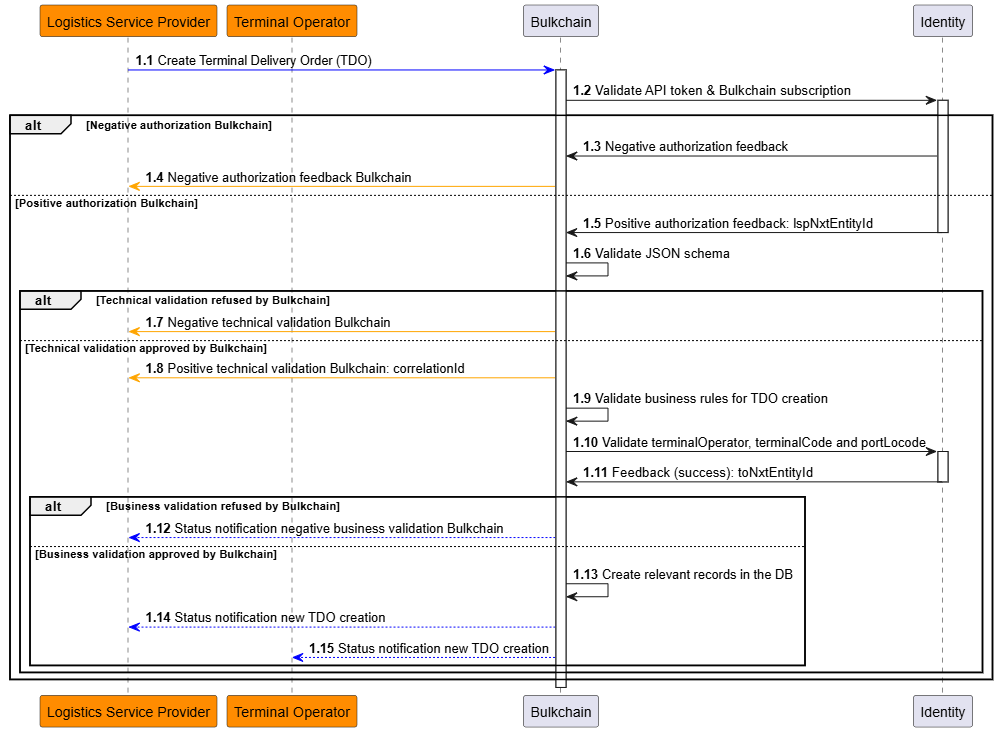
Before having the goods arrive at the terminal, it is important for the logistics service provider to register them in Bulkchain via a terminal delivery order, as this is the starting point for all follow-up processes within Bulkchain.
A logistics service provider has the possibility to create:
-
a terminal delivery order, without stock keeping units nor visits, or
-
a terminal delivery order only having the stock keeping units defined, without any visits, or
-
a terminal delivery order only having the visits defined, without any stock keeping units, or
-
a terminal delivery order with having both the visits and the stock keeping units on those visits defined. In this last case, the stock keeping units can be cross referenced with the visits so that it’s clear for the terminal which SKU(‘s) will be delivered per Visit.
Note that: A Terminal Delivery Confirmation can only be successful when the SKU’s are assigned to the Visit.
Key input data elements and validation rules
TDO
|
Attribute |
Description |
Mandatory |
Validation rule |
Error reason |
|
|
Unique reference for the TDO chosen by the LSP. |
Yes |
Must be unique in combination with lspNxtEntityId (of caller) within Bulkchain/ORP domain. |
BCBV0001 |
|
|
Terminal identifier where the goods will be delivered. |
Yes |
Must be registered for Bulkchain. |
BCBV0002 |
|
|
Expected weight the LSP would like to deliver in tons. |
No |
Field type restriction validation. |
BCTV0001 |
|
|
Final destination for the sea transport of the cargo that will be delivered. |
No |
Field type restriction validation. Must be 5 capital characters. |
BCTV0001 |
|
|
Free text description for the breakbulk cargo that will be delivered. |
No |
Field type restriction validation. |
BCTV0001 |
|
|
Date and timestamp from when the delivery is expected. |
No |
Must be in the future. |
BCTV0002 |
|
|
Date and timestamp until when the delivery is expected. |
No |
Must be after expectedDeliveryDateTimeFrom. |
BCTV0003 |
Please find the full spec: https://documentation.nxtport.com/bulkchain/open-api-specification-swagger
SKU
|
Attribute |
Description |
Mandatory |
Validation rule |
Error reason |
|
|
Indicates that a SKU is created as a batch when set to “true”, provide in request along with appropriate |
No |
Field type restriction validation, “true” or “false”. |
BCTV0001 |
|
|
The amount provided for |
No |
Must be numeric between 1 and 999. |
BCTV0001 |
|
|
Reference for the SKU provided by the LSP or TO. This can be a barcode for example. |
Yes |
Field type restriction validation. |
BCTV0001 |
|
|
Free text description for the breakbulk cargo that is being handled. |
Yes |
Field type restriction validation. |
BCTV0001 |
|
|
Number of pieces that the SKU consists of. This can be for example the “said to contain boxes”. |
Yes |
Must be at least 1. |
BCTV0004 |
|
|
Outbound status for the SKU; this can be “exit” or “storage”. |
Yes |
Validated based on enum. |
BCTV0001 |
|
|
International commercial terms. |
Yes (conditional) |
Rule 1: Validated based on enum Rule 2: Mandatory if status= “exit”. Otherwise, it cannot be provided. |
Rule 1: BCTV0001 Rule 2: BCTV0006
|
|
|
Reference number for the shipment booking that had been made with the Ship Agent. |
Yes (conditional) |
Mandatory if status= “exit”. Otherwise, it cannot be provided. |
BCTV0006 |
|
|
Code used to reference the packaging used or the SKU. |
Yes |
Validated with “CL017” codelist from Customs Authority: https://financien.belgium.be/sites/default/files/Customs/Ondernemingen/Applicaties/technische-documentatie/PNTS/pn-ts-dev-messsage-implementation-guide-v1.2.0.docx |
BCBV0024 |
|
|
Free text description for the packaging used for the SKU. |
No |
Field type restriction validation |
BCTV0001 |
|
|
Marks and numbers that are visually added to the physical SKU, in order to be able to identify on terminal. |
No |
Field type restriction validation |
BCTV0001 |
|
|
Weight of the SKU in kg. |
Yes |
Field type restriction validation. |
BCTV0001 |
|
|
Length of the SKU in cm. |
No |
Field type restriction validation. |
BCTV0001 |
|
|
Width of the SKU in cm. |
No |
Field type restriction validation. |
BCTV0001 |
|
|
Height of the SKU in cm. |
No |
Field type restriction validation. |
BCTV0001 |
|
|
Free text description that contains the instruction for how to properly handle the SKU. |
No |
Field type restriction validation. |
BCTV0001 |
|
|
Free text description that contains the instruction for how to properly store the SKU on the terminal. |
No |
Field type restriction validation. |
BCTV0001 |
|
|
Free text description that contains the instruction for how to properly load the SKU on the ship. |
No |
Field type restriction validation. |
BCTV0001 |
|
|
Free text description that contains the instruction for how to properly stow the SKU on the ship. |
No |
Field type restriction validation. |
BCTV0001 |
|
|
Description that contains the actual condition for a SKU. For example a SKU can be damaged, not sea worthy or any other state of the SKU that is worth registering in Bulkchain. |
No |
Field type restriction validation. |
BCTV0001 |
|
|
Free text description that contains any relevant information in case the SKU is a dangerous good. |
No |
Field type restriction validation. |
BCTV0001 |
Please find the full spec: https://documentation.nxtport.com/bulkchain/open-api-specification-swagger
Visit
|
Attribute |
Description |
Mandatory |
Validation rule |
Error reason |
|
|
Reference for the Visit provided by the LSP. |
Yes |
Must be unique in combination with lspNxtEntityId. |
BCBV0005 |
|
|
Indication of the transport mode the cargo will be delivered with to the terminal. |
Yes |
Validation based on enum. This can be Truck, Barge or Rail |
BCTV0001 |
|
|
Free text description that can be used to reference a license plate, barge name, wagon number,… |
No |
Field type restriction validation. |
BCTV0001 |
|
|
Identifier value for the transport operator company that can be VAT number,… |
No |
Field type restriction validation. |
BCTV0001 |
|
|
Terminal code that enables to identify the physical location of the Terminal within a Port. |
Yes |
Correlation validated with the Terminal Operator element in TDO and according to following list: Terminalcodes.pdf |
BCBV0006 |
|
|
Port location code that enables to identify the port where the terminal is located. |
Yes |
Correlation validated with the Terminal Operator element in TDO. Must be 5 capital characters. |
BCBV0007 |
|
|
Date and timestamp when the visit for delivery is expected to arrive. |
Yes |
Must be in the future. |
BCTV0002 |
Please find the full spec: https://documentation.nxtport.com/bulkchain/open-api-specification-swagger
Key output data elements
Below data elements will be created as a result of a successful operation in Bulkchain:
|
Attribute |
Description |
|
|
Unique functional reference that enables to correlate the original request with subsequent asynchronous notifications. |
|
|
Bulkchain generated unique key for the Terminal Delivery Order. This key is used throughout the Bulkchain application to identify the TDO. |
|
|
Bulkchain generated unique key for the Stock Keeping Unit. This key is used throughout the Bulkchain application to identify the SKU. |
|
|
Bulkchain generated unique key for the Visit. This key is used throughout the Bulkchain application to identify the Visit. |
These keys must be used in any following operation on the respective object in Bulkchain (Get, Update and Delete).
Get (list of) terminal delivery order(s)
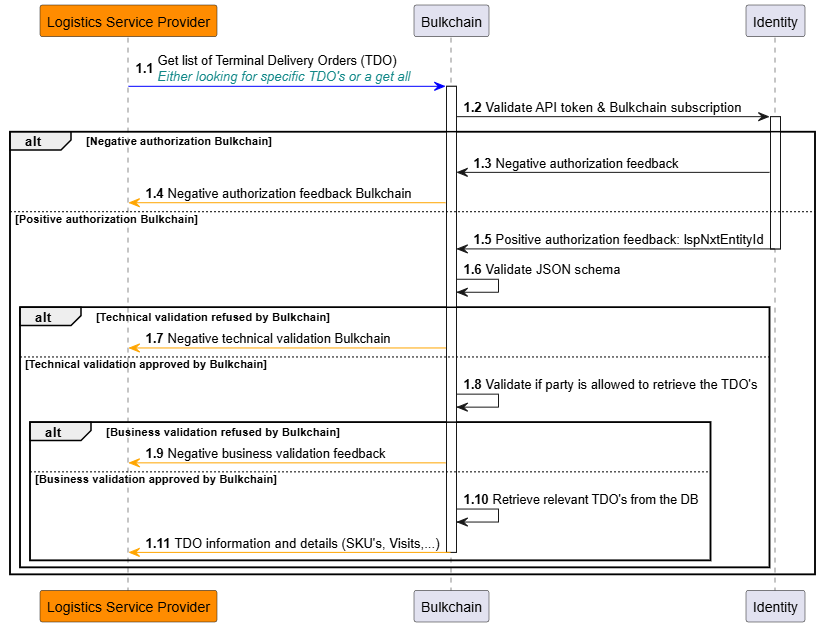
Both the logistics service provider and the terminal operator have the possibility to retrieve the dataset of either specific terminal delivery orders, or of all terminal delivery orders which were created in the last 365 days. Specific TDO’s can be requested by its respective Bulkchain-generated TDO Keys, Bulkchain will validate if the TDO Keys exist for the requester and if the requester is allowed to retrieve them.
If one or more TDO’s can be found, Bulkchain will respond synchronously by providing the full datasets of either the specifically requested terminal delivery orders, or the full datasets of the terminal delivery orders created in the last 365 days, all within one feedback response.
If no TDO can be found, Bulkchain will respond with a synchronous empty response.
Get (list of) stock keeping unit(s)
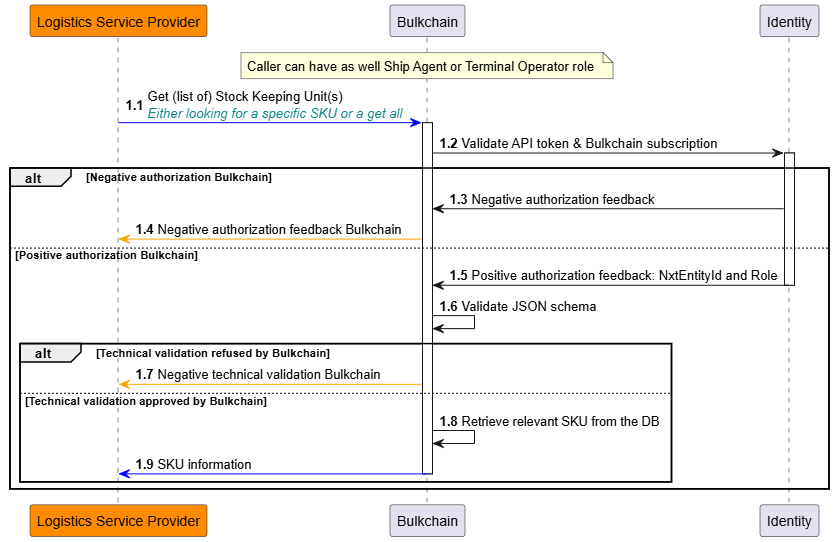
Both the logistics service provider and the terminal operator have the possibility to retrieve the stock keeping unit(s) dataset for either:
-
a specific stock keeping unit, or
-
a terminal delivery order, or
-
a vessel load order, or
-
a get of all stock keeping units which were created in the last 365 days.
Specific stock keeping units can be requested by its respective Bulkchain-generated keys, Bulkchain will validate if the SKU Key, SKU batch Key, Visit Key, TDO Key or VLO Key exist for the requester and if the requester is allowed to retrieve them.
If one or more stock keeping units can be found, Bulkchain will respond synchronously by providing the full datasets of either the specifically requested stock keeping unit(s), or the full datasets of the stock keeping units created in the last 365 days, all within one feedback response.
If no stock keeping unit can be found, Bulkchain will respond with a synchronous empty response.
Get (list of) visit(s)
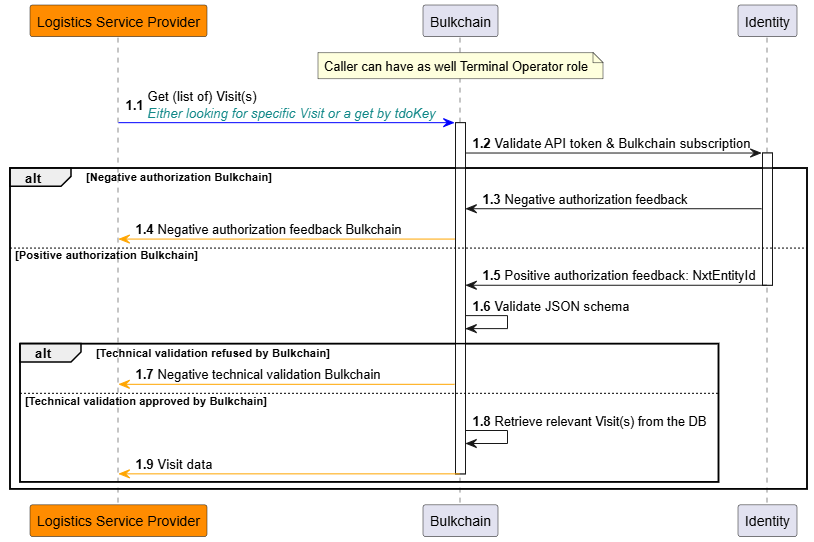
Both the logistics service provider and the terminal operator have the possibility to retrieve the visit(s) dataset for either:
-
a specific visit, or
-
a terminal delivery order, or
-
a get of all visits which were created in the last 365 days.
Specific visits can be requested by its respective Bulkchain-generated keys, Bulkchain will validate if the Visit Key or TDO Key exist for the requester and if the requester is allowed to retrieve them.
If one or more visits can be found, Bulkchain will respond synchronously by providing the full datasets of either the specifically requested visit(s), or the full datasets of the visits created in the last 365 days, all within one feedback response.
If no visit can be found, Bulkchain will respond with a synchronous empty response.
Update of the terminal delivery order
After the terminal delivery order has been created by the logistics service provider, both the logistics service provider and the terminal operator have the possibility to update that same terminal delivery order.
As a logistics service provider, the following update use cases are possible within a specific terminal delivery order:
-
Update its general information
-
Add a new stock keeping unit
-
Delete an existing stock keeping unit
-
Add a new visit
-
Delete an existing visit
-
Update an existing visit
-
Assign a stock keeping unit to a visit
-
Unassign a stock keeping unit from a visit
Important to consider is the fact that Bulkchain only supports the usage of the Bulkchain-generated keys (TDO Key, SKU Key, Visit Key) for any update/delete/assign/unassign operation within Bulkchain on existing objects. These keys are available in the success notifications, please go to https://documentation.nxtport.com/bulkchain/success-notifications for more information.
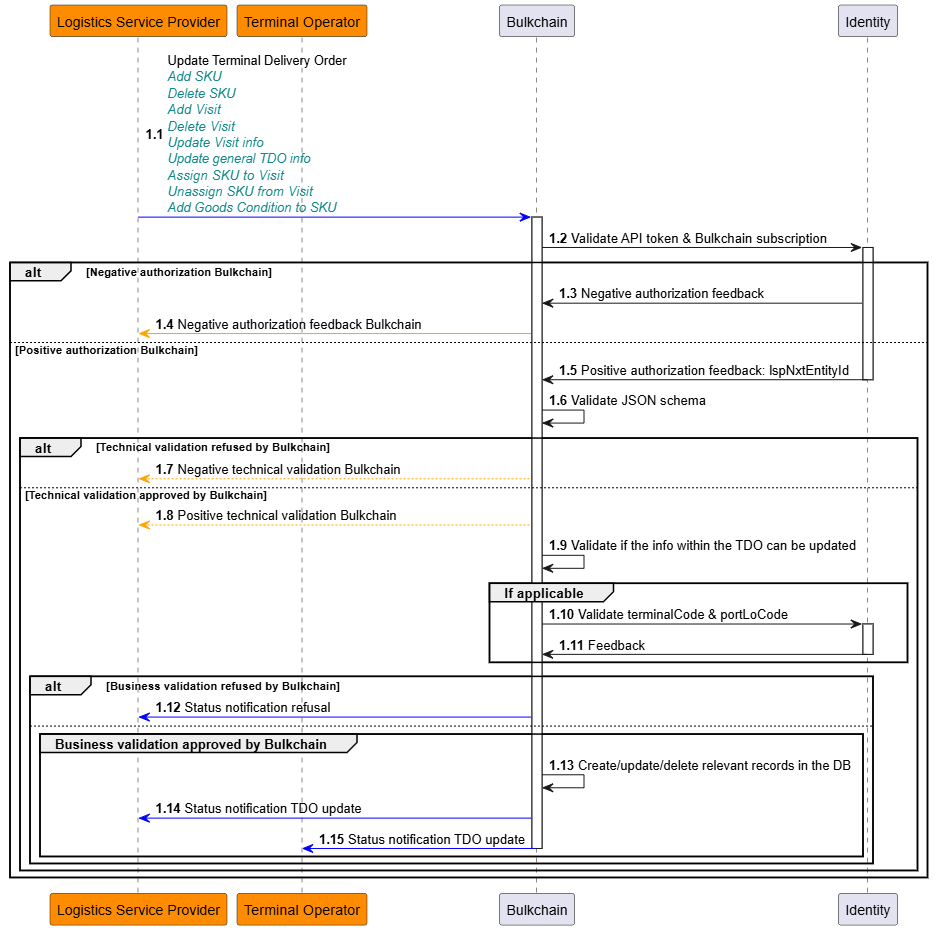
Update general terminal delivery order info
Here, the same technical input validation and business validation rules apply as in the flow regarding the creation of the terminal delivery order: https://documentation.nxtport.com/bulkchain/logistics-service-provider-integration-specificati#LogisticsServiceProviderintegrationspecifications-Keyinputdataelementsandvalidationrules.
Note that the following information cannot be updated by the logistics service provider:
-
The TDO Key
-
The terminal operator information
-
The reference of the terminal operator for the terminal delivery order
Bulkchain will send a notification of the update success towards the original requester, being the logistics service provider, and the terminal operator, including the original TDO Key as unique reference for the respective updated terminal delivery order. Via this TDO Key, the updated full dataset of the related terminal delivery order can be retrieved from Bulkchain.
Add new SKU
Here, the same technical input validation and business validation rules apply on the stock keeping unit (SKU) as in the flow for the creation of the terminal delivery order: https://documentation.nxtport.com/bulkchain/logistics-service-provider-integration-specificati#LogisticsServiceProviderintegrationspecifications-Keyinputdataelementsandvalidationrules. There’s a possiblity to create a batch for a SKU (numberOfSku > 1).
However, in this use case there is no possibility to link/assign the stock keeping unit to a visit. To link/assign the newly created stock keeping unit to a visit, please go to https://documentation.nxtport.com/bulkchain/logistics-service-provider-integration-specificati#LogisticsServiceProviderintegrationspecifications-AssignSKUtovisitintheterminaldeliveryorder.
Bulkchain will send a notification of the addition success towards the original requester, being the logistics service provider, and the terminal operator, including the original TDO Key as unique reference for the respective terminal delivery order, as well as the generated SKU Key for the newly created stock keeping unit. In case of batch there will be a generated batch key for the newly created SKUs.
Via the TDO Key, the updated full dataset of the related terminal delivery order can be retrieved from Bulkchain. Via the SKU Key, the dataset for the created SKU object can be retrieved from the database. Via the Batch Key, the dataset for the created SKU objects can be retrieved from the database.
Delete SKU
The logistics service provider also has the option to delete a stock keeping unit, by providing the SKU Key within its request, while considering the following business validation rule:
-
The stock keeping unit should not be already confirmed via a terminal delivery confirmation from the terminal operator.
Bulkchain will send a notification of the deletion success towards the original requester, being the logistics service provider, and the terminal operator, including the original TDO Key as unique reference for the respective terminal delivery order, as well as the SKU Key representing the stock keeping unit which was deleted.
Via the TDO Key, the updated full dataset of the related terminal delivery order can be retrieved from Bulkchain.
Add new visit in the terminal delivery order
Here, the same technical input validation and business validation rules apply as in the flow regarding the creation of the terminal delivery order. Stock keeping units, that are already existing in the same terminal delivery order, can be linked to that new visit as long as they don’t have a terminal delivery confirmation yet.
Bulkchain will send a notification of the addition success towards the original requester, being the logistics service provider, and the terminal operator, including the original TDO Key as unique reference for the respective terminal delivery order, as well as the generated Visit Key for the newly created visit.
Via the TDO Key, the updated full dataset of the related terminal delivery order can be retrieved from Bulkchain.
Delete visit in the terminal delivery order
The logistics service provider also has the option to delete a visit from a specific terminal delivery order, by providing the Visit Key within its request, while considering the following business validation rules:
-
The visit which the requester intends to delete, should exist within the respective terminal delivery order.
-
Next to that, the visit should not be already confirmed via a terminal delivery confirmation from the terminal operator.
Bulkchain will send a notification of the deletion success towards the original requester, being the logistics service provider, and the terminal operator, including the original TDO Key as unique reference for the respective terminal delivery order, as well as the Visit Key representing the visit which was deleted.
Via the TDO Key, the updated full dataset of the related terminal delivery order can be retrieved from Bulkchain.
Update visit info in the terminal delivery order
Here, the same technical input validation and business validation rules apply as in the flow regarding the creation of the terminal delivery order, next to that:
-
The visit which the requester intends to update, should exist within the respective terminal delivery order.
-
The visit should not be already confirmed via a terminal delivery confirmation from the terminal operator.
Note that the following information cannot be updated by the logistics service provider:
-
The Visit Key
-
The reference of the terminal operator for the visit
Bulkchain will send a notification of the update success towards the original requester, being the logistics service provider, and the terminal operator, including the original TDO Key as unique reference for the respective terminal delivery order, as well as the Visit Key representing the visit which was updated.
Via the TDO Key, the updated full dataset of the related terminal delivery order can be retrieved from Bulkchain.
Assign SKU to visit in the terminal delivery order
The logistics service provider has the possibility to assign an existing stock keeping unit to an existing visit within the same terminal delivery order. For this, the following business validation rules need to be considered:
-
It is important to know that both the stock keeping unit as the visit need to exist in the same terminal delivery order, and
-
That the stock keeping unit should not be assigned already to another visit. In that case, the stock keeping unit should first be unassigned from that other visit.
Bulkchain will send a notification of the assignment success towards the original requester, being the logistics service provider, and the terminal operator, including the original TDO Key as unique reference for the respective terminal delivery order, as well as the Visit Key representing the visit to which the stock keeping unit was assigned.
Via this TDO Key, the updated full dataset of the related terminal delivery order can be retrieved from Bulkchain.
Unassign SKU from visit in the terminal delivery order
The logistics service provider has the possibility to unassign an already assigned stock keeping unit from its visit within the same terminal delivery order. For this, the following business validation rules need to be considered:
-
The stock keeping unit and the visit need to exist in the same terminal delivery order, and
-
The stock keeping unit should already be assigned to that visit, before being able to be unassigned from it, and
-
The stock keeping unit cannot be unassigned from the visit if it already received a terminal delivery confirmation from the terminal operator.
Bulkchain will send a notification of the unassignment success towards the original requester, being the logistics service provider, and the terminal operator, including the original TDO Key as unique reference for the respective terminal delivery order, as well as the Visit Key representing the visit from which the stock keeping unit was unassigned.
Update SKU
The logistics service provider has the ability to update the properties of a stock keeping unit and can register a Goods Condition.
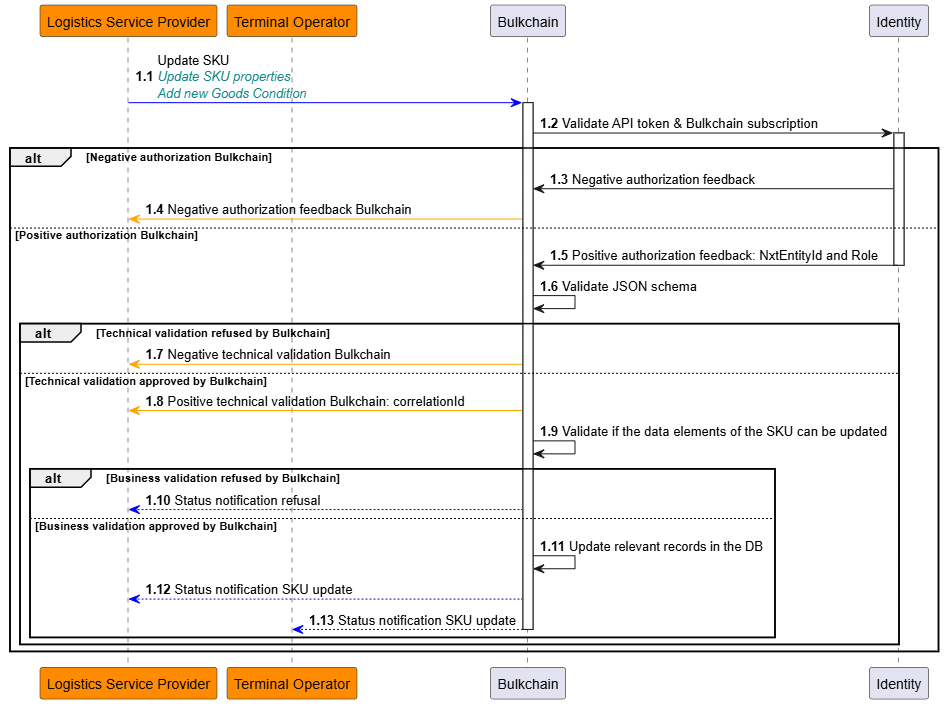
Update SKU info
The logistics service provider has the option to update a stock keeping unit by providing the SKU Key or Batch Key within its request, while considering the following business validation rules:
-
The same technical input validation rules apply on the stock keeping unit as in the flow for the creation of the terminal delivery order (https://documentation.nxtport.com/bulkchain/logistics-service-provider-integration-specificati#LogisticsServiceProviderintegrationspecifications-Createterminaldeliveryorder), except that the mandatory attributes now become optional. Attributes incoTerms and bookingNumber are still conditionally mandatory following the business validation rules.
-
Also, the SKU Key and Batch Key cannot be updated.
-
If a SKU belongs to a batch, it can only be updated by its Batch Key.
-
And, in case the SKU (or at least one in case of batch) is related to a VLO, the state must be “Draft”.
-
Lastly, in this use case there is no possibility to link/assign the stock keeping unit to another visit. To link/assign a stock keeping unit to a visit, please go to https://documentation.nxtport.com/bulkchain/logistics-service-provider-integration-specificati#LogisticsServiceProviderintegrationspecifications-AssignSKUtovisitintheterminaldeliveryorder.
Bulkchain will send a notification of the update success towards the original requester, being the logistics service provider, and the terminal operator, including the SKU Key representing the stock keeping unit which was updated.
Via the SKU Key, the updated full dataset of the related stock keeping unit can be retrieved from Bulkchain.
Add goods condition to SKU
The logistics service provider has the possibility to add a goods condition to a stock keeping unit, following business validation rules need to be considered:
-
The stock keeping unit needs to exist within the terminal delivery order, and
-
In case the SKU is related to a VLO, the state must be “Draft”, and
-
The goods condition type and description need to be in conformity with the input validation rules as specified in the flow for creating a terminal delivery order.
Bulkchain will send a notification of the addition success towards the original requester, being the logistics service provider, and the terminal operator, including the original TDO Key as unique reference for the respective terminal delivery order, as well as the SKU Key representing the stock keeping unit for which a goods condition was added.
Deletion of the terminal delivery order
After the terminal delivery order has been created by the logistics service provider, it has the possibility to delete that same terminal delivery order.
Important to consider is the fact that Bulkchain only supports the usage of the Bulkchain-generated keys (TDO Key, Goods Reservation Key, SKU Key, Visit Key) for any update/delete/assign/unassign operation within Bulkchain on existing objects. These keys are available in the success notifications, please go to https://documentation.nxtport.com/bulkchain/success-notifications for more information.
As a result of a Delete TDO operation, all related objects such as Goods Reservation, SKU and Visit will be deleted as well.
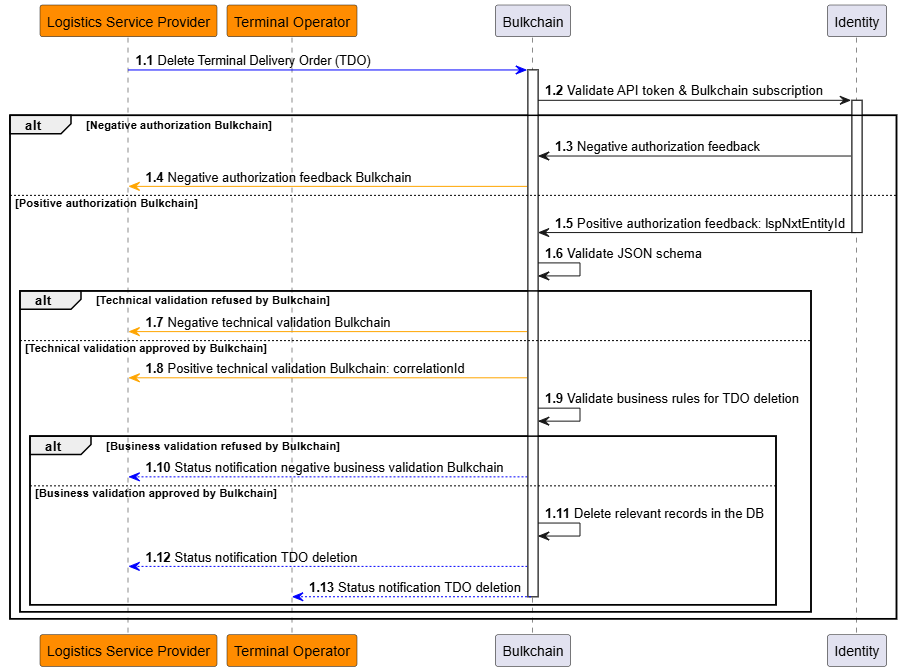
Upon successful technical validation by Bulkchain, asynchronous processing will be done by Bulkchain. Here, a set of business rules will be validated upon the received request:
-
Check that the terminal delivery order exists for the logistics service provider which has submitted the request, and
-
There cannot be a terminal delivery confirmation for one of the stock keeping units defined in that terminal delivery order.
In case one or more business validation errors are triggered, a notification will be sent out towards the original requester. This notification will contain a full list of business validation errors that have been encountered. For the full list of business rules and the related error codes, please refer to https://documentation.nxtport.com/bulkchain/technical-and-business-validation#Technicalandbusinessvalidation-Businessvalidation.
When the business validation has passed, Bulkchain will send a notification of the deletion success towards the original requester, being the logistics service provider, and the terminal operator, including the original TDO Key as unique reference for the respective terminal delivery order.
Vessel Load Order (VLO)
Purpose
A Vessel Load Order (VLO) is used by a Logistics Service Provider (LSP) to plan which outbound cargo (SKU’s) will be loaded onto a sea-going vessel. The VLO is then progressively shared with:
-
the Ship Agent (SA) for review and further enrichment,
-
and later the Terminal Operator (TO) for execution/loading follow-up.
VLO lifecycle (states)
A VLO progresses through the following states:
-
Draft(created by LSP; not yet shared) -
Master Permit(shared by LSP with SA) -
Loading Permit(shared by SA with TO) -
Mate’s Receipt(set by TO) -
Final Mate’s Receipt(set by TO)
Note: Depending on role, Bulkchain restricts which VLO’s can be retrieved and which state transitions can be triggered.
Create Vessel Load Order
When to use
Create a VLO when you want to announce which cargo (SKU’s) will be loaded on a vessel, and which Ship Agent and Terminal Operator are involved.
Important behavior
-
Processing is asynchronous:
-
If authorization + schema validation pass, Bulkchain responds synchronously with
202 Acceptedand acorrelationId. -
Business validation and creation happen asynchronously and result in a notification.
-
-
The initial VLO state depends on
isConfirmed:-
isConfirmed=false→ VLO is created inDraft -
isConfirmed=true→ VLO is created inMaster Permit(and is immediately shared with the Ship Agent)
-
Key input data elements and validation rules (Create VLO)
|
Attribute |
Description |
Mandatory |
Key validation rules (summary) |
|---|---|---|---|
|
|
Your functional reference for the VLO (used later for filtering). |
Yes |
Field type restrictions apply. |
|
|
Port LoCode where loading takes place. |
Yes |
Field type restrictions apply. |
|
|
Terminal code where loading takes place. |
Yes |
Must resolve (together with |
|
|
Port LoCode where SKU will be discharged. |
Yes |
Field type restrictions apply. |
|
|
Identification type for the Ship Agent. |
Yes |
Enum validation (e.g. EORI, VAT, NxtEntityId). |
|
|
Identification code for the Ship Agent. |
Yes |
Must resolve to a Ship Agent with Bulkchain subscription. |
|
|
Vessel name. |
No |
Field type restrictions apply. |
|
|
Voyage number. |
No |
Field type restrictions apply. |
|
|
Shipping line for the sea going vessel. |
No |
Field type restrictions apply. |
|
|
Permit / reference number. |
No |
Field type restrictions apply. |
|
|
Name of the contact person that is responsible for handling the VLO, which could be contacted outside of Bulkchain. |
No |
Field type restrictions apply. |
|
|
Phone number of the contact person. |
No |
Field type restrictions apply. |
|
|
Bulkchain SKU keys to associate to the VLO. |
No* |
Business rules apply (see below). Mandatory when |
|
|
Controls whether VLO is immediately shared with SA. |
Yes |
If |
SKU assignment business rules (applied when skuKey[] is provided)
-
SKU must exist and belong to the calling LSP.
-
SKU must not already be assigned to another VLO.
-
SKU
statusmust beexit. -
SKU Terminal Operator must match the VLO Terminal Operator.
-
VLO where at least 1 SKU is dangerous, requires all SKU to be dangerous.
Key output
|
Attribute |
Description |
|---|---|
|
|
Reference to correlate your request with asynchronous notifications. |
|
|
Bulkchain-generated key for the Vessel Load Order (returned via notification). |
API specification
See the full OpenAPI specification here:
https://documentation.nxtport.com/bulkchain/open-api-specification-swagger
Get (list of) Vessel Load Order(s)
When to use
Retrieve:
-
a specific VLO (by
vloKey), or -
a list of VLO’s using optional filters, or
-
all VLO’s from the last 365 days (default “get all” behavior).
Important behavior
-
This operation is handled synchronously.
-
Access scope depends on your role. As LSP, you can retrieve VLO’s linked to your company across all states.
Supported filters
-
vloKey(specific VLO) -
lspReference -
permitNumber -
no filters → “get all” for the last 365 days
API specification
See the full OpenAPI specification here:
https://documentation.nxtport.com/bulkchain/open-api-specification-swagger
Get assignable stock keeping units
When to use
Retrieve the stock keeping units (SKU’s) that can be assigned to a Vessel Load Order (VLO):
-
before assigning SKU’s to an existing VLO in
Draft, or -
before creating a new VLO with
isConfirmed=true.
Unlike GET /v1/skus, this operation applies the SKU eligibility rules for VLO assignment. API consumers do not need to retrieve all SKU’s and apply these rules themselves.
Important behavior
-
This operation is handled synchronously: eligible SKU’s are returned directly in the response.
-
The operation is available to the Logistics Service Provider (LSP) / Forwarder. Results are always limited to the calling LSP’s SKU’s.
-
Provide exactly one context:
-
vloKeyfor an existing VLO, or -
terminalCodetogether withportLoCodefor a new VLO.
-
-
For an existing VLO, the VLO must belong to the calling LSP and be in state
Draft. -
Retrieving assignable SKU’s does not create a VLO or assign SKU’s. Use the Create VLO or Update VLO operation to perform the assignment.
Key input data elements and validation rules (Get assignable SKU’s)
GET /v1/vlos/assignable-skus
|
Attribute |
Description |
Mandatory |
Key validation rules (summary) |
|---|---|---|---|
|
|
Bulkchain-generated key of the existing VLO to which SKU’s will be assigned. |
Yes, for an existing VLO. |
Must identify a VLO owned by the calling LSP in state |
|
|
Terminal code where loading will take place for a new VLO. |
Yes, for a new VLO. |
Must be provided together with |
|
|
Port LoCode where loading will take place for a new VLO. |
Yes, for a new VLO. |
Must be provided together with |
Note: This endpoint uses the query parameter
portLoCode. When creating the VLO, provide the corresponding loading port in theportOfLoadingfield.
SKU eligibility rules
Only SKU’s that meet the following conditions are returned:
-
SKU belongs to the calling LSP.
-
SKU status is
Exit. -
SKU is not assigned to any VLO, including the VLO specified in the request.
-
SKU belongs to a TDO for the relevant Terminal Operator:
-
for an existing VLO, this restriction applies when the VLO has a Terminal Operator;
-
for a new VLO, the Terminal Operator is resolved from
terminalCodeandportLoCode.
-
Goods type
-
If the existing VLO already contains SKU’s, only additional SKU’s of the same goods type are returned: dangerous or non-dangerous.
-
If the existing VLO does not yet contain SKU’s, no goods-type restriction is derived from existing assignments.
-
For a new VLO, eligible SKU’s of both goods types are returned.
Note: Returning both goods types does not mean they can be combined in one VLO. Select SKU’s in accordance with the goods-type rules described under Create VLO. The same eligibility rules are applied when creating the VLO or assigning SKU’s.
Key output
|
Attribute |
Description |
|---|---|
|
Response body |
An array of SKU objects ( |
Validation errors
Validation errors are returned synchronously.
|
Condition |
HTTP status |
Business validation code |
|---|---|---|
|
No context is provided, both contexts are provided, or only one of |
|
— |
|
The |
|
|
|
The existing VLO is not in state |
|
|
|
The VLO does not exist or does not belong to the calling LSP. |
|
— |
API specification
See the full OpenAPI specification here:
https://documentation.nxtport.com/bulkchain/open-api-specification-swagger
Update Vessel Load Order (as LSP)
Supported update use cases
As LSP you can:
-
Update general VLO info (limited set of fields)
-
Assign SKU(s) to the VLO
-
Unassign SKU(s) from the VLO
-
Share the VLO with the Ship Agent (state change to
Master Permit)
Important behavior
-
Processing is asynchronous (same pattern as Create):
202 + correlationIdsynchronously, outcome via notification. -
A single update request must target exactly one VLO (
vloKey).
Update general VLO info (allowed fields)
You can update:
-
lspReference -
vesselName -
voyageNumber -
permitNumber -
shippingLine -
contactPerson -
contactPhone
You cannot update (if these change, create a new VLO instead):
-
terminalCode -
portOfLoading -
portOfDischarge -
shipAgent
(Un)assign SKU(s)
-
Use Get assignable stock keeping units to retrieve additional SKU’s eligible for assignment. SKU’s already assigned to the VLO are not included in that response.
-
Provide one or more
skuKey. -
The same SKU business rules apply as in Create VLO.
-
In case one or more SKU(’s) have been assigned already to the VLO, they will be replaced by the SKU('s) provided in the request. This implies that SKU’s can be unassigned from the VLO, resulting from this operation.
Unassign SKU(s)
-
A SKU can only be unassigned if it is currently assigned to the VLO.
Share VLO with Ship Agent
-
Provide
action = "confirm" -
At least one SKU must already be assigned to the VLO.
API specification
See the full OpenAPI specification here:
https://documentation.nxtport.com/bulkchain/open-api-specification-swagger
Delete Vessel Load Order (as LSP)
When to use
Delete a VLO when it is no longer valid.
Important behavior
-
Processing is asynchronous (same pattern as Create/Update).
-
Deletion is a soft delete of the VLO (SKU’s themselves are not deleted).
-
Notification recipients depend on the current VLO state:
-
LSP always receives a notification
-
SA receives it if state is
Master Permitor later -
TO receives it if state is
Loading Permitor later
-
API specification
See the full OpenAPI specification here:
https://documentation.nxtport.com/bulkchain/open-api-specification-swagger
Export Permit
When to use
Export a permit when an authorized API consumer needs a PDF version of an existing Vessel Load Order. The export is only available when the VLO is in Mate’s Receipt state.
Important behavior
-
This operation is handled synchronously: when validation succeeds, Bulkchain returns the generated PDF document directly in the response.
-
Supported callers are Logistics Service Provider / Forwarder, Ship Agent, and Terminal Operator, provided the requested VLO is within their allowed scope.
-
The requested VLO must exist, be in scope for the caller, and have state
Mate’s Receipt. If these checks fail, no PDF is generated. -
The generated permit clearly shows the current VLO state. For a successful export in this feature, that state is
Mate’s Receipt. -
The export does not create, update, delete, or change the state of any VLO, SKU, Visit, or Goods Condition data.
-
No asynchronous business notification is expected for this export flow.
Key input data elements and validation rules (Export Permit)
|
Attribute |
Description |
Mandatory |
Key validation rules (summary) |
|---|---|---|---|
|
|
Bulkchain-generated key of the VLO for which the permit PDF is requested. |
Yes |
Field type restrictions apply. The VLO must exist, be in scope for the caller, and be in |
Key output
|
Attribute |
Description |
|---|---|
|
|
Generated permit PDF for the requested VLO, returned directly in the successful response. |
|
|
Filename includes the permit number, current VLO state, and export timestamp. |
PDF generation rules
-
The PDF uses the permit template and A4 page format.
-
The current VLO state is shown as a variable value on the permit.
-
Relevant VLO data and all linked SKU data are included according to the permit layout.
-
If the SKU list spans multiple pages, additional pages are generated and page numbering reflects the actual number of pages.
-
Optional fields that are not available may remain empty.
API specification
See the full OpenAPI specification here:
https://documentation.nxtport.com/bulkchain/open-api-specification-swagger
Small happy flow (end-to-end)
Happy flow — Create and execute a Vessel Load Order
-
LSP creates a VLO as
Draft-
LSP calls Create VLO with
isConfirmed=false -
Bulkchain returns
202 Accepted+correlationId(async outcome via notification)
-
-
LSP assigns SKU(s) to the VLO
-
LSP calls Update VLO (assign SKU(s))
-
Bulkchain returns
202 Accepted+correlationId(async outcome)
-
-
LSP shares VLO with Ship Agent (SA)
-
LSP calls Update VLO (share with SA) (
action=confirmed) -
VLO state becomes
Master Permit -
Notifications are sent (LSP + SA)
-
-
SA reviews and optionally updates general info
-
SA calls Update VLO (general info) (limited fields)
-
State remains
Master Permit -
Notifications are sent (SA + LSP)
-
-
SA shares VLO with Terminal Operator (TO)
-
SA calls Update VLO (share with TO) (
action=confirmed) -
VLO state becomes
Loading Permit -
Notifications are sent (LSP + SA + TO)
-
-
TO confirms loading progress
-
TO calls Update VLO (set Mate’s Receipt) → state becomes
Mate’s Receipt -
TO calls Update VLO (set Final Mate’s Receipt) → state becomes
Final Mate’s Receipt -
Notifications are sent (LSP + SA + TO)
-
Role access matrix (retrieve + update)
1) Retrieve permissions (Get VLO(s))
|
VLO state |
LSP can retrieve |
SA can retrieve |
TO can retrieve |
|---|---|---|---|
|
|
Yes |
No |
No |
|
|
Yes |
Yes |
No |
|
|
Yes |
Yes |
Yes |
|
|
Yes |
Yes |
Yes |
|
|
Yes |
Yes |
Yes |
Notes for “Get” behavior
-
If a VLO is not found or not in scope for the caller, Bulkchain returns a synchronous empty response.
-
If no filter is provided, Bulkchain returns all VLO’s from the last 365 days related to the caller.
2) Update permissions (high-level)
|
Role |
Main update capabilities |
State constraints (summary) |
|---|---|---|
|
LSP |
Update general info, assign/unassign SKU(s), share with SA, delete VLO |
Operates primarily before sharing (typically while |
|
SA |
Update limited general info, share with TO, reject VLO |
Update allowed when state is |
|
TO |
Set |
|